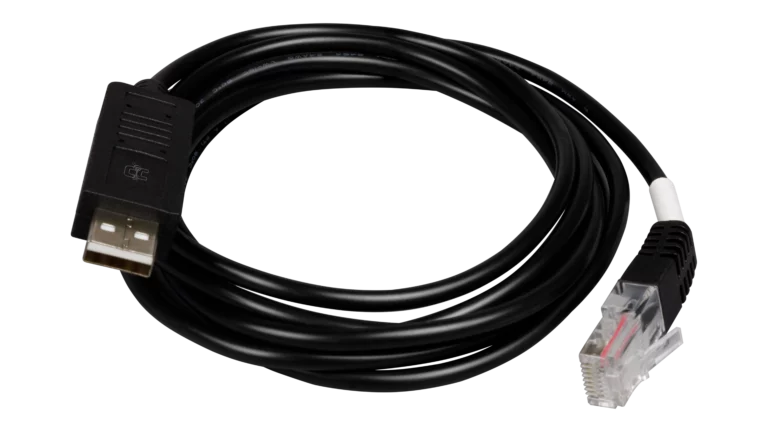
EG4 Electronics USB Battery Read-Write and Firmware Update Communication Cable for LL, LifePower4, And WallMount Batteries
SKU: EG4SPRS485RWCLPLL
Product Summary
Specifications:
- RS485 version updates LCD displays and provides real-time battery monitoring
- RS232 version enables BMS firmware updates for improved battery performance
- Essential cable for battery diagnostics, updates, and PC-based monitoring software
- USB-A to RJ45 with specialized dongle for direct PC connection
Log in to check member price and detailed stock information.
Log in to see additional stock details


Current Connected is YOUR EG4 Electronics product specialist
These cables connect EG4 batteries directly to a PC via USB port for use with EG4's BMS Tools software. The RS485 cable provides real-time battery monitoring, displaying state of charge, individual cell voltages, current flow, temperatures, and alarm status. The RS232 cable enables firmware updates when EG4 releases new versions to improve battery performance or fix issues.
Different EG4 battery models require different cables. The EG4 LL V2 and LL-S series, EG4 WallMount Indoor 280Ah, WallMount All Weather, and LifePower4 V2 batteries can utilize both cables - RS232 for installing firmware updates and RS485 for monitoring. Some older EG4 battery models may use RS232 for both monitoring and firmware updates, though this configuration is being phased out in newer models.
Cable requirements depend on your intended use. If you only need to monitor battery performance and never plan to update firmware, the RS485 cable alone may suffice for compatible models. If your battery model requires firmware updates or you want full functionality, you will need both cables for WallMount and LifePower4 series batteries.
Batteries cannot communicate with PC software while connected to an inverter for closed-loop communication, so inverter cables must be disconnected during PC monitoring or firmware updates.
Recommended Accessories
Customer Reviews
No reviews yet. Be the first to review this product!