Fortress Power Envy Monitoring Dongle, WLAN or Cellular Monitoring Modules for Envy 8kW, 10kW, and 12kW Inverters, Remote Monitoring via Fortress Power App
SKU: 850079800069
Product Summary
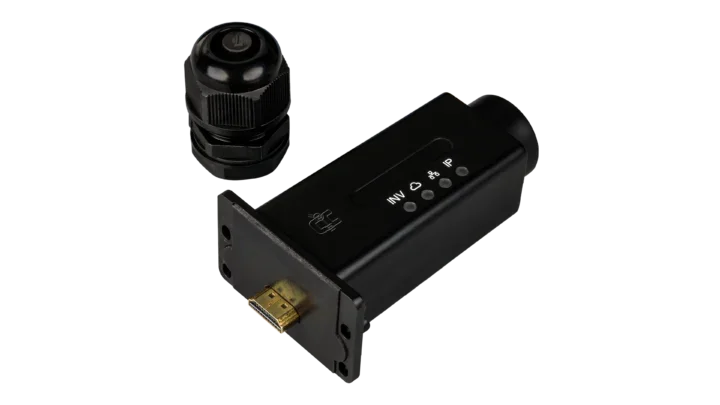
The Fortress Power Envy WLAN Dongle adds wireless remote monitoring to your Envy hybrid inverter by connecting through your home or business Wi-Fi network. Monitor real-time solar production, battery SOC, power flow, and consumption from anywhere using the Envy Fortress Power app or web portal.
Specifications:
- Compatible Models: Envy 8kW, Envy 10kW, Envy 12kW
- Connection Type: WLAN (Wi-Fi) via existing router
- Setup: Temporary Wi-Fi broadcast (SSID: "BA" + serial number) for initial configuration
- Status Indicator: 3 solid LED lights confirm successful connection
- Monitoring Access: Envy Fortress Power app (iOS & Android) and envy.fortresspower.io
- Installer Feature: Fleet-wide system visibility via installer portal
- Quantity Required: One per inverter
Log in to check member price and detailed stock information.
| Need more than what's available? Tell us what you need and we can source it for you. |


Current Connected is YOUR Fortress Power product specialist
The Fortress Power Envy Monitoring Dongle is a plug-in remote monitoring module for the Fortress Power Envy line of hybrid inverters. Available in two connectivity options — WLAN (Wi-Fi) and 4G cellular — the dongle enables real-time system monitoring and remote access through the Fortress Power monitoring platform. Both versions are compatible with the Envy 8kW, Envy 10kW, and Envy 12kW models.
Without a dongle installed, the Envy inverter can only be monitored and configured locally through its built-in LCD screen. With a dongle installed, homeowners and installers gain remote access to live system data from anywhere.
Choose Your Connection Type
WLAN Dongle — Best for homes and businesses with a stable Wi-Fi network. Connects to the Fortress Power monitoring platform through the property's existing Wi-Fi router.
4G Dongle — Best for off-grid installations, remote properties, cabins, and any location where reliable Wi-Fi is unavailable. Connects directly to the monitoring platform over a 4G cellular network — no router or local internet required.
WLAN (Wi-Fi) Dongle
How It Works
The WLAN dongle plugs directly into the communication port on the Envy inverter while the inverter is energized. Once connected, the dongle broadcasts its own temporary Wi-Fi network named "BA" followed by the dongle's serial number. Using the Envy Fortress Power mobile app (available on iOS and Android), the installer connects to this temporary network, enters the home Wi-Fi router's SSID and password, and the dongle bridges to the home network. When the connection is successful, the dongle displays three solid LED indicator lights. The entire setup process typically takes just a few minutes.
Monitoring and Access
Once connected, the dongle transmits inverter data to the Fortress Power monitoring platform. Homeowners and installers can log into the Envy Fortress Power app or the web portal at envy.fortresspower.io to view real-time information including power flow direction, solar production, battery SOC (State of Charge), grid export, and total consumption.
Installers can register systems under their customer code so that every installation they complete is reflected in their installer portal, giving them visibility across all deployed systems.
The web portal is the recommended method for initial registration and system configuration. Installers log in at envy.fortresspower.io, create a station (plant name), associate the dongle by entering its serial number and PIN (both printed on the side of the dongle and on the packaging), and then set up end-user access with either full or read-only permissions.
4G Cellular Dongle
How It Works
The 4G dongle plugs directly into the communication port on the Envy inverter. Once connected, it establishes a cellular data connection to the Fortress Power monitoring server without requiring any local network configuration. This eliminates the Wi-Fi setup steps required by the WLAN dongle and makes the installation process faster for sites without existing internet infrastructure.
Monitoring and Access
Once the dongle is online, it transmits inverter data to the same Fortress Power monitoring platform used by the WLAN dongle. Homeowners and installers can log into the Envy Fortress Power app (available on iOS and Android) or the web portal at envy.fortresspower.io to view real-time power flow, solar production, battery SOC (State of Charge), grid export, and consumption data. Installers can register the system under their customer code for fleet-wide visibility across all deployed systems.
Registration follows the same process as the WLAN dongle: the dongle's serial number and PIN (printed on the side of the dongle and on the packaging) are entered in the web portal or app to associate it with a station and end-user account.
When to Choose 4G Over WLAN
Common use cases for the 4G dongle include off-grid cabins, agricultural buildings, construction sites, remote homes without broadband internet, and any installation where running ethernet or maintaining a Wi-Fi router is impractical.
Important Notes
- The monitoring dongle is an accessory. The Envy inverter operates fully without it. Removing or disconnecting the dongle does not affect the inverter's ability to charge batteries, power loads, or manage power sources — it only removes remote monitoring capability.
- One dongle is required per inverter. In parallel installations with multiple Envy units, each inverter needs its own dongle for full system visibility through the monitoring platform.
- Compatible models: Envy 8kW, Envy 10kW, Envy 12kW.
Customer Reviews
No reviews yet. Be the first to review this product!